PragerU
- 3.4
- Rating
- 1.00M
- Installs
- Free
- Price

 Analysis by App-foxy
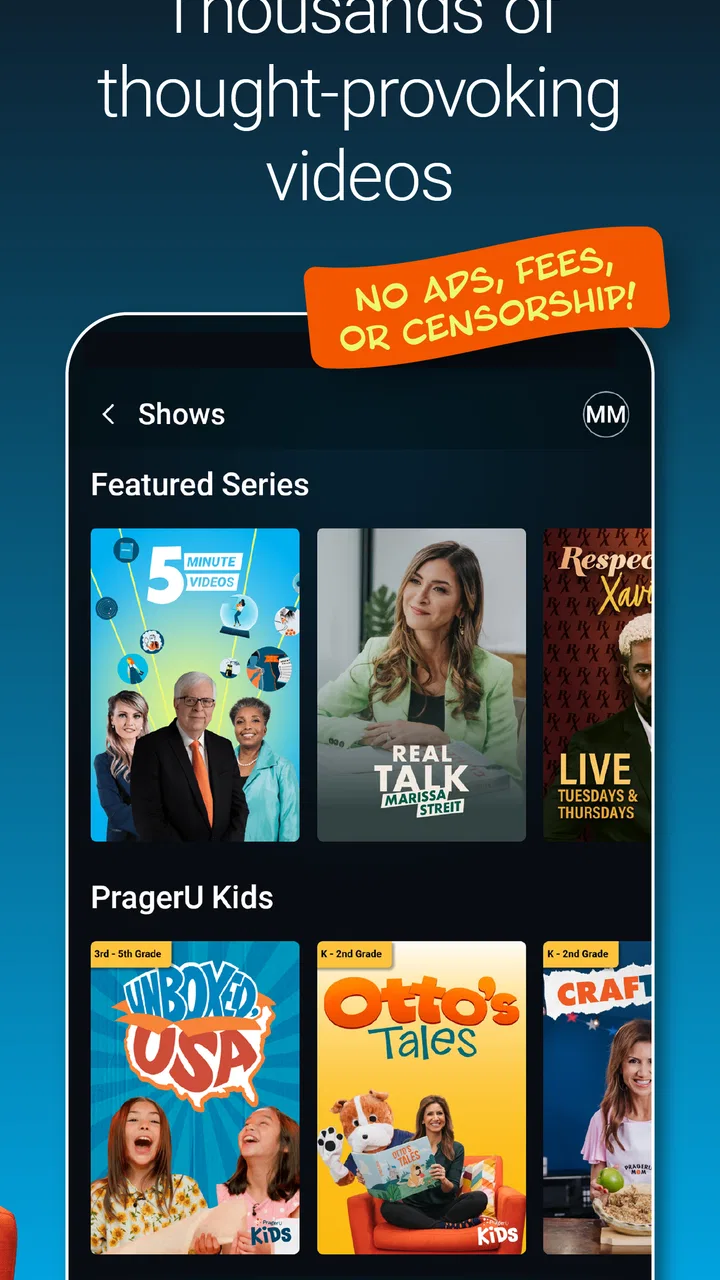
I found PragerU most useful when I treated it as a shared video-learning app rather than a complete course platform. It gives a household an easy way to open short educational material, watch together, and start conversations about history, government, culture, economics, and civic ideas. The tone is clearly pro-American, so that viewpoint is central to the experience rather than a minor detail.
That makes the app quite different from a neutral reference tool or a school-style learning system. I would recommend it to families and individuals who want accessible videos built around a particular worldview. I would not use it as the only source for a child’s social studies education, and I would be cautious about handing it to younger viewers without discussing what they watch. The content is marked for Everyone, but an age label alone does not tell you whether every topic will suit every child or whether every presentation will match your family’s expectations.
How PragerU works in a shared household
The simplest household use is also the strongest: one person chooses a video, everyone watches, and the family talks afterward. That can work during a quiet evening, a weekend breakfast, or a car trip when one device is being used as a viewing screen. The app’s educational and entertaining approach is better suited to short, focused sessions than to replacing a textbook or planning an entire curriculum.
You May Also Like

 Blood Strike: 2.5 Anniversary
Blood Strike’s Loadouts Turn Every Drop Into a Tactical Gamble
A close look at Blood Strike’s custom loadouts: how fast access to signature weapons reshapes its battle royale rhythm, rewards preparation, and narrows the gap between fights.

 Pandora - Music & Podcasts
Pandora’s Music Is Easy to Start, but Harder to Recover
Pandora’s strength is its low-effort path from a seed to a station. Its weak spot is how much confidence it asks you to place in connection, setup, and quiet recovery.

 8 Ball Pool
 Is Built on Rivalries, Rematches, and Routine
A close look at the rivalries, rematches, shared routines, and unanswered safety questions that turn a quick pool match into a persistent mobile community.

 Samsung Music
’s Quiet Strength Is Playing What You Already Own
Its reach comes less from spectacle than from dependable access to a personal library. That simplicity is both the app’s strongest retention engine and its ceiling.

 AccuWeather: Weather Radar
AccuWeather Review: A Quick, Clear Forecast for Everyday Decisions
For everyday plans, the best forecast is the one you can understand quickly. AccuWeather makes rain timing, radar, and local conditions easy to act on, with a few trade-offs.

 Hill Climb Racing
Why Hill Climb Racing Still Turns Crashes Into One More Run
A tiny car, a bumpy hill and one more upgrade: Hill Climb Racing keeps resurfacing because its simple chaos makes every near-miss feel personal.
More From Our News Desk



I like this format because it lowers the barrier to starting a discussion. A child may not volunteer a question about civics or economics after reading a chapter, but a video can give the family a common starting point. The useful part is not merely pressing play. It is pausing afterward and asking what the video argued, which examples supported that argument, and what information might be missing.
For a shared device, I would create a simple household routine before installing it. Decide who normally selects material, whether children can browse alone, and when adults should watch alongside them. This is not a technical control system; it is a practical boundary that prevents the app from becoming an unplanned stream of content. If several people use the same phone or tablet, a bit of coordination matters more than a complicated setup.
One realistic example would be a parent and a teenager watching a video about an American institution after school. Instead of treating the viewing as a finished lesson, the parent could ask the teenager to summarize the central claim in their own words, then compare it with a library book, classroom notes, or another reputable educational source. That workflow turns a viewpoint-driven video into a prompt for media literacy rather than asking it to carry the entire lesson.
The app comes from PragerU, and its identity is easy to recognize. Its videos are designed to present pro-American ideas in a polished, approachable format. That clarity can be appealing when you already want material that supports those themes. It can also be limiting when you are looking for a broad range of interpretations presented with equal weight.
Setting expectations before the first viewing
Setup is less about complicated configuration and more about agreeing on account and device boundaries. On a family tablet, I would avoid assuming that every user wants the same recommendations, topics, or viewing habits. If adults and children share one screen, keep the device’s general use in mind and decide whether browsing happens independently or with an adult nearby.
I would also explain to children that an educational label does not mean a video is automatically objective. That conversation is especially important here because the app has a defined ideological perspective. A useful rule is to separate three questions: what does the video claim, what evidence does it use, and what would another source say? This approach respects the app’s purpose without presenting its viewpoint as the only possible conclusion.
There is a practical trade-off in using one shared profile or one shared device: convenience versus personal context. A single household viewing habit is easy to maintain, but it may not reflect the interests or maturity of every person using it. If a younger child sees a topic selected for an older sibling, an adult may need to step in and decide whether to continue, pause, or choose something else.
Because the app is free, trying it does not require a purchase decision. That makes it easy to test during a family discussion or a personal study session. Still, free access should not be confused with a complete educational plan. I would pair it with books, classroom material, primary sources, museum resources, or other video providers, depending on the subject.
The app supports Android devices running version 7.0 or later, which covers many older phones and tablets. That is helpful for households that keep a spare device for children or use an older tablet as a kitchen or living-room screen. Before relying on it for a group session, I would install it on the actual device you plan to use and check that the viewing experience is comfortable on that screen.
Coordinating viewing without turning it into homework
A shared app works best when the family agrees on a small amount of structure. I would not schedule long, rigid lessons around it. Instead, choose one topic, watch one item, and leave enough time for conversation. The goal is to make the app a doorway into learning, not another source of pressure.
For younger viewers, an adult can preview the topic by reading its title and deciding whether it fits the moment. For older students, let them choose between a few relevant subjects and explain why they picked one. That small act of choice makes the session more engaging while keeping the household involved in what is being watched.
Another useful habit is to keep a shared note with three headings: “main idea,” “strongest example,” and “question to check.” After viewing, each person contributes one short answer. This method is particularly valuable with persuasive educational content because it encourages everyone to distinguish a memorable presentation from a well-supported conclusion.
I would also avoid using the app as a substitute for a conversation about disagreement. If one family member strongly agrees with a video and another does not, that is not necessarily a failed session. Ask each person to identify the point where their interpretations diverge. The app can work well as a discussion starter precisely because its perspective is visible.
Coordination becomes more important when a household has different ages and interests. A parent may want political or historical material, while a child may prefer a lighter educational topic. Rather than forcing everyone to watch everything together, alternate shared sessions with individual viewing under agreed boundaries. That keeps the app from becoming either a private black box or a family obligation.
Age, trust, and the limits of the Everyone label
The Everyone content rating makes the app broadly approachable, but I would still use adult judgment. “Suitable for everyone” does not guarantee that every topic will be equally interesting, emotionally comfortable, or developmentally useful for every child. A parent who knows the child’s sensitivities and attention span is in a better position to choose than a general rating can be.
Trust should work in both directions. Children should know they can ask why a video presents an idea in a particular way, and adults should be willing to answer without treating disagreement as misbehavior. That is especially important in a household where the app’s pro-American framing may fit one person’s beliefs more closely than another’s.
I would not recommend unsupervised use for a child who is too young to recognize persuasion or distinguish an opinion from settled fact. The videos may be educational and entertaining, but presentation style can make an argument feel more definitive than it is. A short follow-up conversation can correct that imbalance without dismissing the material entirely.
For teenagers, the app can be more useful as a source to analyze than as a final authority. Ask them to identify the intended audience, the emotional language, and the examples selected. Then have them find a contrasting explanation from a teacher, library resource, or established educational source. This turns a potential weakness—the narrow viewpoint—into an opportunity to practice evaluating information.
Adults should also remember that shared-device use can blur personal boundaries. A child may open the app expecting a general learning experience while encountering a subject chosen by another household member. Agreeing on who selects content and when is a simple way to keep trust intact. I would rather have clear family expectations than assume the age rating solves every supervision question.
Where it stands beside familiar education alternatives
Compared with a textbook, PragerU is quicker to approach and easier to use for a short discussion, but it does not offer the same depth, references, or systematic progression that a well-designed course can provide. Compared with a neutral encyclopedia, it is more direct and persuasive, while an encyclopedia is usually better for checking definitions, timelines, and multiple perspectives.
Compared with general video platforms, its educational identity makes the subject matter feel more focused, and its pro-American viewpoint is more consistent. General platforms, however, may offer a wider range of voices and more specialized material. They also require more careful filtering because educational quality can vary widely.
Compared with a structured learning service, this app is less useful for tracking a student through lessons, assignments, and measurable progress. I would choose a formal course platform when a child needs a sequence, practice exercises, teacher feedback, or preparation for an exam. I would choose this app when I want a concise presentation that can spark curiosity or family discussion.
The most important comparison is not whether it is “better” than those alternatives. It serves a different purpose. Its strength is accessibility and a recognizable point of view. Its weakness is that the same point of view can make it a poor fit for someone seeking balanced coverage or a complete academic foundation.
What the numbers and practical details suggest
PragerU is a free Education app with more than a million installs, so it has clearly reached a substantial audience beyond a single household. Its average rating is 3.4 from roughly 6,000 ratings, with about 2,000 written reviews. I read that combination as a sign to keep expectations realistic: the app is established and widely tried, but it is not universally satisfying.
It has been available since October 1, 2016, and the Android requirement of 7.0 or newer makes it accessible on a range of older hardware. Those details matter if you are setting up a spare family tablet rather than buying a new device. The free price also makes experimentation easy, but the real cost is time: families should decide whether the content fits their learning goals before making it part of a regular routine.
The app’s store summary describes educational, entertaining, pro-American videos for every age, while the store’s short description is simply “PragerU.” In practice, I would focus less on the slogan and more on the viewing context. The app is most valuable when the household understands that it offers a particular editorial lens, not a replacement for every other educational resource.
Who should use it, and who should skip it
I would suggest trying it if you enjoy short-form learning, want material that presents American civic and cultural themes from a pro-American perspective, or need a conversation starter for a family evening. It can also suit an adult who wants a quick introduction to a topic before deciding whether to research it more deeply.
I would be more cautious if you need a neutral curriculum, detailed citations, formal assessment, or guaranteed balance between competing interpretations. Students preparing for an academic assignment should use the app as one input, then verify claims and broaden their sources. A teacher or parent may find it useful as a discussion prompt, but not as the sole authority for a lesson.
I would also skip it for a household that wants completely hands-off children’s viewing. The Everyone rating is reassuring, yet supervision and context still matter. If adults are not prepared to discuss perspective, topic suitability, or disagreement, a more structured and carefully moderated learning resource may be a better choice.
My household verdict
After using it as a family-oriented learning aid, I see PragerU as a focused option with a clear identity, not an all-purpose education library. It is easy to justify as a free addition to a shared device when the household wants short videos and is comfortable engaging with a pro-American perspective.
My strongest recommendation is to build a small routine around it: choose together, watch attentively, ask what was argued, and check important claims elsewhere. That workflow makes the app more valuable than passive viewing and helps children learn how perspective shapes educational media.
For a household that values open discussion and already uses several learning sources, it can earn a place in the rotation. For someone seeking a neutral, comprehensive, or formally structured course, I would choose a different tool. The best way to use this app is as a starting point for informed conversation, not as the final word.
FAQs for PragerU
01What is PragerU, and what type of content does it offer?
PragerU is an educational platform that provides content on various topics such as politics, economics, and philosophy. It features short videos, podcasts, and articles designed to spark dialogue and promote conservative viewpoints. Users can explore a wide range of subjects, making it suitable for those interested in these perspectives.
02Is PragerU free to use, or does it require a subscription?
PragerU is primarily free to use, allowing users access to a vast library of content without a subscription. However, there are options for donations and memberships, which provide additional benefits like exclusive content and early access to certain materials. This makes it accessible while offering support opportunities.
03What platforms is PragerU available on, and how can I download it?
PragerU is available on both Android and iOS platforms. Users can download the app directly from the Google Play Store or the Apple App Store. Additionally, content can be accessed through the PragerU website and various social media channels, ensuring a wide availability across devices.
04How does PragerU ensure the accuracy and credibility of its content?
PragerU collaborates with experts and thought leaders in various fields to produce its content. While it aims to provide credible information, it's important for users to recognize its conservative bias. Cross-referencing with other sources is recommended for a well-rounded understanding of any topic.
05Can I interact with other PragerU users or participate in discussions?
PragerU encourages user interaction through its app and website. Users can comment on videos, participate in discussions, and share content on social media. This engagement fosters a community of like-minded individuals eager to explore and discuss conservative ideas, enhancing the learning experience.
Pros
- User-friendly interface with intuitive navigation.
- High-quality video content and production.
- Free access to a wide range of topics.
- Regular updates with fresh content.
- Offline viewing available for convenience.
Cons
- Limited interactive features for engagement.
- Content may have a political bias.
- Requires account for personalized features.
- Video buffering issues on slower connections.
- No live discussion or Q&A sessions.

PragerU
Gallery